

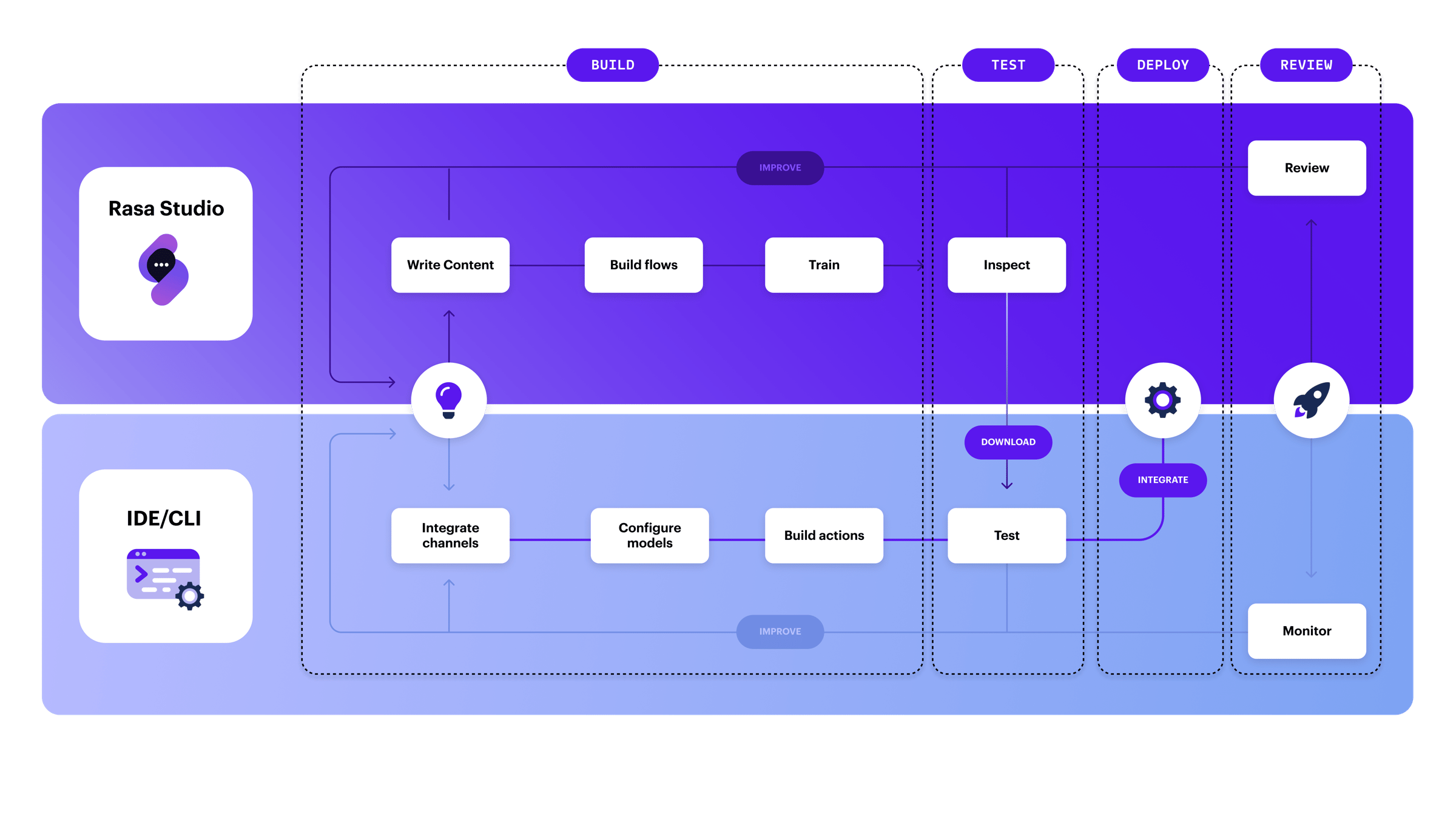
Workflow with the Rasa Platform
1. Build
Design, develop, and configure user journeys while improving existing ones. Use these platform tools to streamline development:Write Content Studio
- Create, edit, and delete templated responses centrally in the Rasa Studio CMS.
- Create, edit, and delete intents directly within the CMS when using Rasa NLU.
- Empower copywriters, designers, and AI trainers to maintain conversational content efficiently.
Build Flows Studio
- Visually build conversational experiences using the flow builder in Rasa Studio.
- Structure the business logic of customer interactions into modular, reusable flows.
- Combine different elements to build everything from simple Q&As to complex, multi-turn conversations—without writing code.
Train Models Studio
- Train your assistant to apply updates after defining flows and content.
Integrate Channels Pro
- Configure and manage channel integrations in Rasa Pro.
- Add and maintain integrations across iterations, making modifications as needed.
Configure Models Pro
- Integrate and fine-tune language models to optimize dialogue management.
- Enhance responses using retrieval-augmented generation (RAG) services.
Build Actions Pro
- Write custom Python actions to handle complex logic, integrate APIs, and extend conversational capabilities.
- Surface custom actions in Rasa Studio for reuse across your assistant.
2. Test
Verify and refine your assistant’s behavior before deployment.Inspect and Debug Studio
- Use Rasa Studio’s Inspector to test and debug the conversation flows you built.
- Visualize flow navigation, track collected information (slots), and analyze responses.
- Quickly identify issues and refine conversations for a smoother user experience.
Run Automated Tests Pro
- Execute automated tests written in Rasa Studio or Rasa Pro.
- Validate end-to-end assistant behavior to ensure consistency and reliability.
- Use automated testing to verify integrations and prevent regressions.
3. Deploy
Promote your tested assistant into production using your preferred infrastructure.Deploy Pro
- Deploy in a scalable, production-ready environment with Rasa Pro.
- Choose on-prem, cloud, or Kubernetes deployment options.
- Leverage built-in versioning, rollback support, and monitoring for smooth rollouts.
4. Review
Analyze real conversations and refine your assistant based on user interactions.Conversation Review Studio
- Access and analyze production conversation logs in the Conversation Review panel.
- Filter by topic or key metrics to identify patterns and optimize responses.
- Debug and refine assistant behavior using real-world data.
Monitor Performance Pro
- Use Rasa Pro’s monitoring tools for real-time visibility into your assistant’s performance.
- Track logs, analytics, and dashboards to optimize dialogue flows and detect issues early.