

SingleStepLLMCommandGenerator
To interpret the user’s message in context, the current implementation of theSingleStepLLMCommandGenerator uses
in-context learning, information about the current state of the conversation, and flows defined in your assistant.
Descriptions and slot definitions of each flow are included in the prompt as relevant information. However, to
scale to a large number of flows, the LLM-based command generator includes only the flows that are relevant to the current
state of the conversation, see flow retrieval.
Prompt Template
The default prompt template serves as a dynamic framework enabling theSingleStepLLMCommandGenerator
to render prompts. The template consists of a static component, as well as
dynamic components that get filled in when rendering a prompt:
- Current state of the conversation - This part of the template captures the ongoing dialogue.
- Defined flows and slots - This part of the template provides the context and structure for the conversation. It outlines the overarching theme, guiding the model’s understanding of the conversation’s purpose.
- Active flow and slot - Active elements within the conversation that require the model’s attention.
SingleStepLLMCommandGenerator is as follows:
Customization
You can customize theSingleStepLLMCommandGenerator as much as you wish.
General customization options that are available for both LLMCommandGenerators are listed in the section
General Customizations.
Customizing the Prompt Template
If you cannot get something to work via editing the flow and slot descriptions (see section customizing the prompt), you can go one level deeper and customise the prompt template used to drive theSingleStepLLMCommandGenerator.
To do this, write your own prompt as a jinja2 template and provide it to the component as a file:
config.yml
Deprecation WarningThe former
LLMCommandGenerator’s prompt configuration is replaced by SingleStepLLMCommandGenerator’s prompt_template in version 3.9.0.
The prompt configuration variable is now deprecated and will be removed in version 4.0.0.- Iterating over the
flow_slotsvariable can be useful to create a prompt that lists all the slots of the current active flow,
- Iterating over the
available_flowsvariable can be useful to create a prompt that lists all the flows,
MultiStepLLMCommandGenerator
TheMultiStepLLMCommandGenerator also uses in-context learning to interpret the user’s message in context,
but breaks down the task into several steps to make the job of the LLM easier. The component was designed to
enable cheaper and smaller LLMs, such as gpt-3.5-turbo, as viable alternatives to costlier but more powerful
models such as gpt-4-0613.
The steps are:
- handling the flows (starting, ending, etc.) and
- filling out the slots
MultiStepLLMCommandGenerator has two prompts:
handle_flowsandfill_slots.
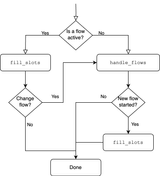
handle_flows prompt is used to start or clarify flows.
If a flow is started, next the fill_slots prompt is executed to fill any slots of the newly started flow.
If a flow is currently active, the fill_slots prompt is called to fill any new slots of the currently active flow.
If the user message (also) indicates that, for example, a new flow should be started or the active flow should be
canceled, a ChangeFlow command is triggered. This results in calling the handle_flows prompt to start, cancel,
or clarify flows. If that prompt leads to starting a flow, the fill_slots prompt is executed again to fill any slots
of that new flow.
Prompt Templates
The default prompt templates serve as a dynamic framework enabling theMultiStepLLMCommandGenerator
to render prompts. The templates consists of a static component, as well as
dynamic components that get filled in when rendering a prompt.
- handle_flows
- fill_slots
- Current state of the conversation: This part of the template captures the ongoing dialogue.
- Defined flows: This part of the template provides the context and structure for the conversation. It outlines the overarching theme, guiding the model’s understanding of the conversation’s purpose.
- Active flow: Displays the name of the current active flow (if any). Used within conditional statements to customize the message about the flow’s status.
Customization
You can customize theMultiStepLLMCommandGenerator as much as you wish.
General customization options that are available for both LLMCommandGenerators are listed in the section General Customizations.
Customizing The Prompt Template
If you cannot get something to work via editing your flow and slot descriptions (see section customizing the prompt), you can go one level deeper and customise the prompt templates used to drive theMultiStepLLMCommandGenerator.
To do this, write your own prompt as a jinja2 template and provide it to the component as a file:
config.yml
handle_flows
Here is a comprehensive list of available variables to use in your customhandle_flows prompt template:
- Iterating over the
available_flowsvariable can be useful to create a prompt that lists all the flows,
By default following commands can be predicted in this step:
StartFlow, Clarify, CancelFlow, CannotHandle.
fill_slots
Here is a comprehensive list of available variables to use in your customfill_slots prompt template:
- Iterating over the
flow_slotsor thetop_user_flow_slotsvariable can be useful to create a prompt that lists all the slots of the current active flow (can be a pattern) or the top user flow,
- Iterating over the
available_flowsvariable can be useful to create a prompt that lists all the flows,
By default only
SetSlot commands can be predicted in this step.
Prompt Tuning
Apart from the prompt customization proposed in the section on Customizing The Prompt, theMultiStepLLMCommandGenerator might benefit from some additional prompt tuning.
Few-shot learning
Few-shot learning is a machine learning approach in which an AI model learns to make accurate predictions by being trained on a very small number of labeled examples. Our internal experiments showed that adding some examples of user message to command pairs to the prompt templatehandle_flows helped to improve the performance of the LLM, especially for the Clarify command.
To do so, curate a small list of user message - action list pairs of examples that are specific to the domain of your assistant. Next, you can add them to the prompt template handle_flows after
line 22. Here is an example:
Language of the prompt
In our internal experiments, we have found that smaller LLMs benefit from having the complete prompt in a single language. Hence, if your assistant is built to understand and respond to a user in a language other than English and the flows descriptions as well as the collect step descriptions are in that same language, the LLM might benefit from translating the prompt template to that language as well. For example, assume users are talking in German to your assistant and the flow descriptions and collect step descriptions are also in German. To simplify the job of the LLM it might help to translate the complete prompt template to German as well. You can use strong LLMs, such asgpt-4-0613, for translating.
However, we recommend to manually check the prompt templates after translating it automatically.
Formatting
In both prompt templates,handle_flows and fill_slots, we iterate over the flows and/or the slots.
Depending on the descriptions you wrote for those, it might make sense to update the for loop in the prompt templates.
For example, if your slot descriptions are rather long and contain a list of bullet points, the slot list in the final
prompt might look like this:
Current Limitations
TheMultiStepLLMCommandGenerator will be able to generate the following commands:
- in
handle_flowsstep:StartFlow,Clarify,CancelFlow,CannotHandle. - in
fill_slotsstep:SetSlot. The CannotHandle command will be triggered from thehandle_flowsprompt when the scope of the user message is beyond starting, canceling, or clarifying a flow. The command will trigger the cannot handle pattern to indicate that the user message can not be treated as expected.