

- Qualitative Evaluation with Inspector Tools like the Inspector allow you to explore real or test conversations step by step, seeing exactly how the LLM and flows behave.
- Quantitative Evaluation with E2E Tests End-to-end tests automate entire conversation scenarios, ensuring that your assistant handles them exactly as you expect. E2E tests are best suited for scripted conversations and are an important guardrail to prevent regressions—especially as you iterate on your flows, patterns, or LLM prompts.
- Simulation & Evaluation LLM-simulated conversations let you test whether your agent achieves high-level goals without scripting every turn. Use this in your local build loop alongside E2E tests in CI. See the Simulation and Evaluation reference.
What Is E2E Testing?
End-to-End testing in Rasa checks your assistant as a whole system, from user message to final bot response or action. This includes:- Assertions: Validate that certain events happen in the conversation as expected (e.g., a slot is set, a flow is started, a specific action is triggered, a response is grounded).
- Custom Actions: Run or stub out actions to test side effects (e.g., calling an API or setting multiple slots).
- Generative Responses: Use specialized assertions (like “generative_response_is_relevant”) to confirm that generative responses from the Response Rephraser or Enterprise Search are sufficiently on-topic or factually accurate.
- Test Coverage: Understand which flows or commands have been tested. Some advanced features let you generate coverage reports highlighting gaps in tested flows.
How to Write E2E Tests
E2E test cases live in YAML files in your project’stests directory. These can be subdivided for better organization (e.g., tests/e2e_test_cases.yml, or tests/pattern_tests/test_patterns.yml, etc.).
Below is a condensed guide to writing E2E tests. For a deeper reference on every possible key/value, see the Test cases reference.
1. Step-Based Test Case Format:
Create a file (e.g.,tests/e2e_test_cases.yml) where you include test cases:
Each test_case:
- Has a
name(e.g.,user books a restaurant). - Contains a sequence of
stepsdescribing the interaction.
2. Writing Steps
user step
Simulates the user’s message. May optionally include metadata to specify additional context (e.g., device info or session data).
bot or utter step
Checks the expected textual response from the bot.
bot:matches the exact text of the bot’s last utterance.utter:matches the domain-defined response name (likeutter_welcome).
slot_was_set:confirms the assistant sets a slot. If you provide a value, it checks that it’s the correct value.slot_was_not_set:confirms the assistant did not set a particular slot or did not set it to a specific value.
3. Using Assertions Instead of Steps
If you want more detailed checks, you can use assertions. For example:tests/e2e_test_cases.yml
If a user step contains assertions, the older step types like bot:
… or utter: … are ignored within that same step. You’ll have to rely on the
bot_uttered
assertion to check the response.- flow_started: Verify a specified flow has begun.
- flow_completed: Confirm a flow (or a specific flow step) has finished.
- flow_cancelled: Ensure a flow (or designated flow step) was cancelled.
- pattern_clarification_contains: Check that the expected clarification suggestions (flow names) are returned.
- slot_was_set: Validate that a slot is filled with the expected value.
- slot_was_not_set: Confirm that a slot is not set or does not have a specific value.
- action_executed: Assert that a particular action was triggered.
- bot_uttered: Verify the bot’s response (including text, buttons, or domain response name) matches expectations.
- bot_did_not_utter: Ensure the bot’s response does not match a specified pattern.
- generative_response_is_relevant: Check that the generative response is contextually relevant (using a relevance threshold).
- generative_response_is_grounded: Confirm that the generative response is factually accurate against a ground truth.
4. Fixtures for Pre-Filled Slots
To test scenarios where users already have certain context (e.g., a “premium” user logged in), you can define top-levelfixtures to set slot values before the test begins:
tests/e2e_test_cases.yml
5. Converting Sample Conversations
If you have design documents or sample interactions in CSV/XLSX, you can generate initial tests via:How to Run Tests
Once you have written your E2E tests, you can run them via the CLI using the command:rasa test e2e
Head over to the command reference for a full list of arguments.
Testing Custom Actions
By default, E2E tests call your action server in the background if yourendpoints.yml is configured. Make sure the action server is running:
stub_custom_actions section in your test file. Under this key, map custom action names to dictionaries that specify the expected events and responses—mirroring the output of the action server. This avoids calling the actual action server during tests.
For example, stubbing the check_balance action might look like:
test_case_id::action_name to differentiate them.
Interpreting Results
- The CLI will print a summary of passing or failing test cases.
- Any mismatches appear in a diff-like format, showing the expected versus actual events.
Coverage metrics help you see which flows and commands are not tested.
If key flows appear missing, add more E2E tests.
Test Results Analysis
When running test cases with assertions, the test runner provides an accuracy summary for each assertion type in that specific test run. The accuracy is calculated by dividing the number of successful assertions by the total of successful and failed assertions. Note that any assertions skipped due to a prior assertion failing are excluded from the accuracy calculation.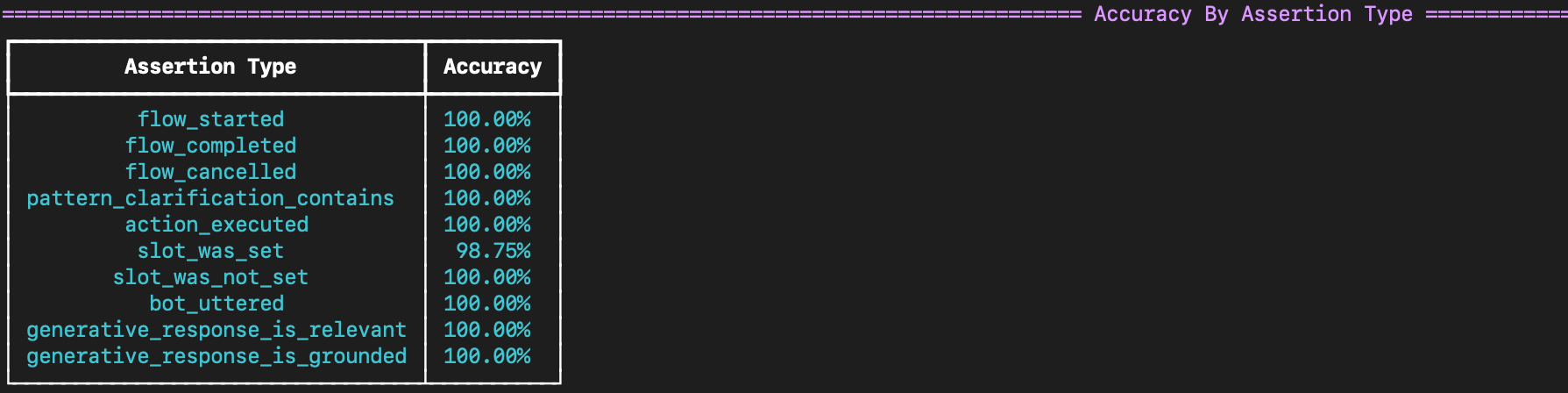
To Sum it Up:
- Use Test-Driven Development: Begin writing E2E tests (or converting real conversations) early.
- Automate: Integrate E2E tests into your CI/CD pipeline to catch regressions.
- Monitor: Once in production, keep an eye on real user interactions for new edge cases or performance drifts, then add or update tests accordingly.