> ## Documentation Index
> Fetch the complete documentation index at: https://rasa.com/docs/llms.txt
> Use this file to discover all available pages before exploring further.
# Model Download API for CI Integration
> GraphQL API for retrieving download URLs for trained models and input data from Rasa Studio for CI/CD integration.
## Introduction
The Model Download API provides external access to retrieve download URLs for artifacts generated in Rasa Studio, facilitating CI/CD integration.
Built with GraphQL, this API allows queries to request trained assistant models and associated input data in YAML format.
## Requirements
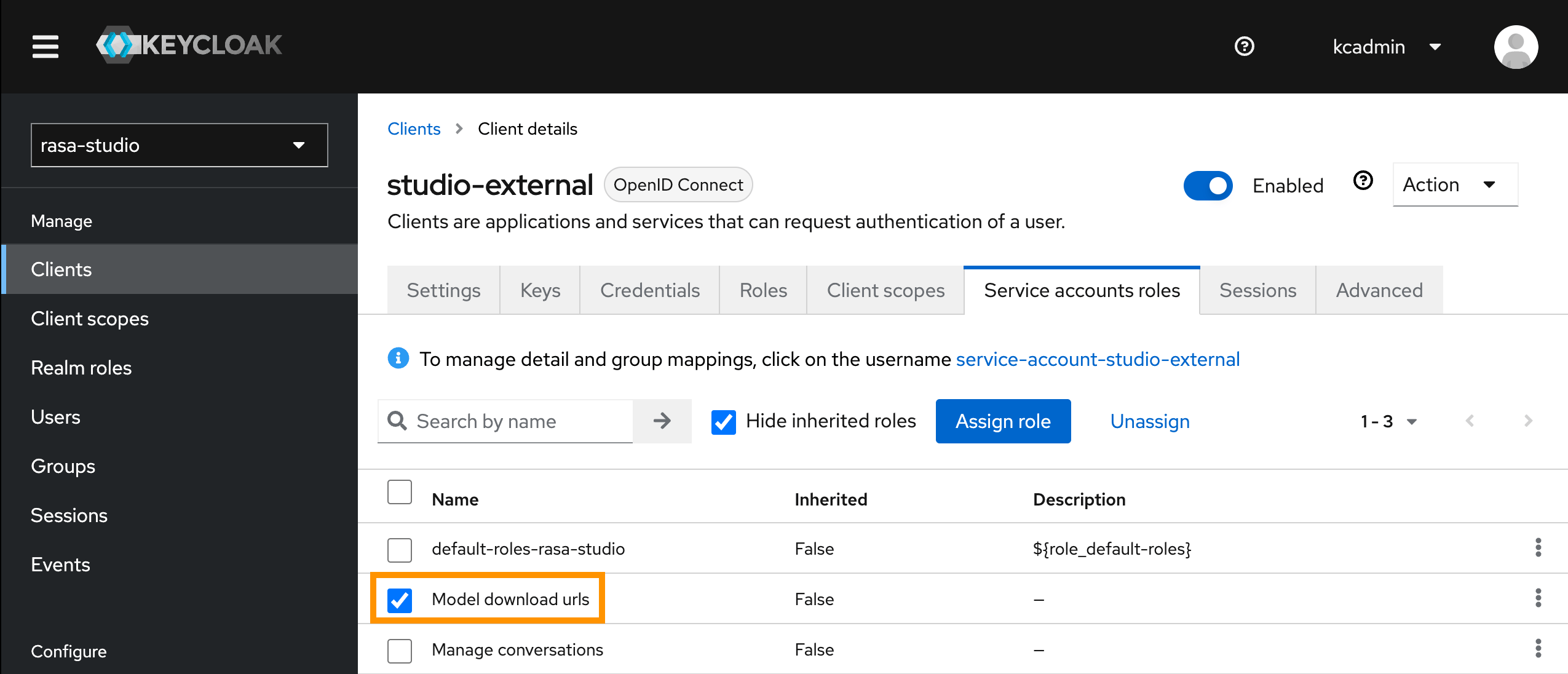
* Required API Role `Model download urls`. See [Authorization](/docs/reference/api/studio/api-authorization) to learn how to get an access token.
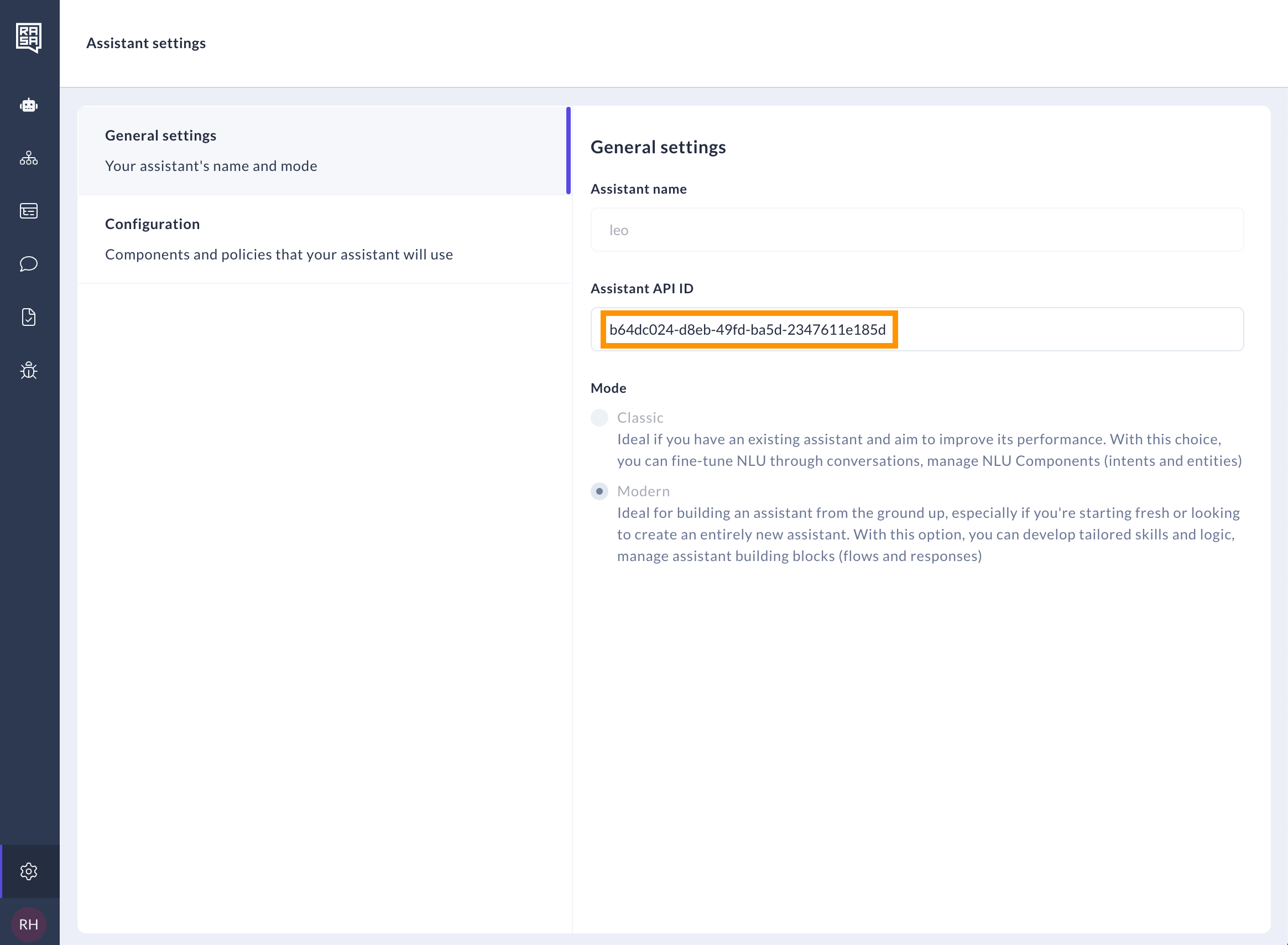
 * Assistant API ID. See [authorization guide for configuration](/docs/studio/installation/setup-guides/authorization-guide) for more details.
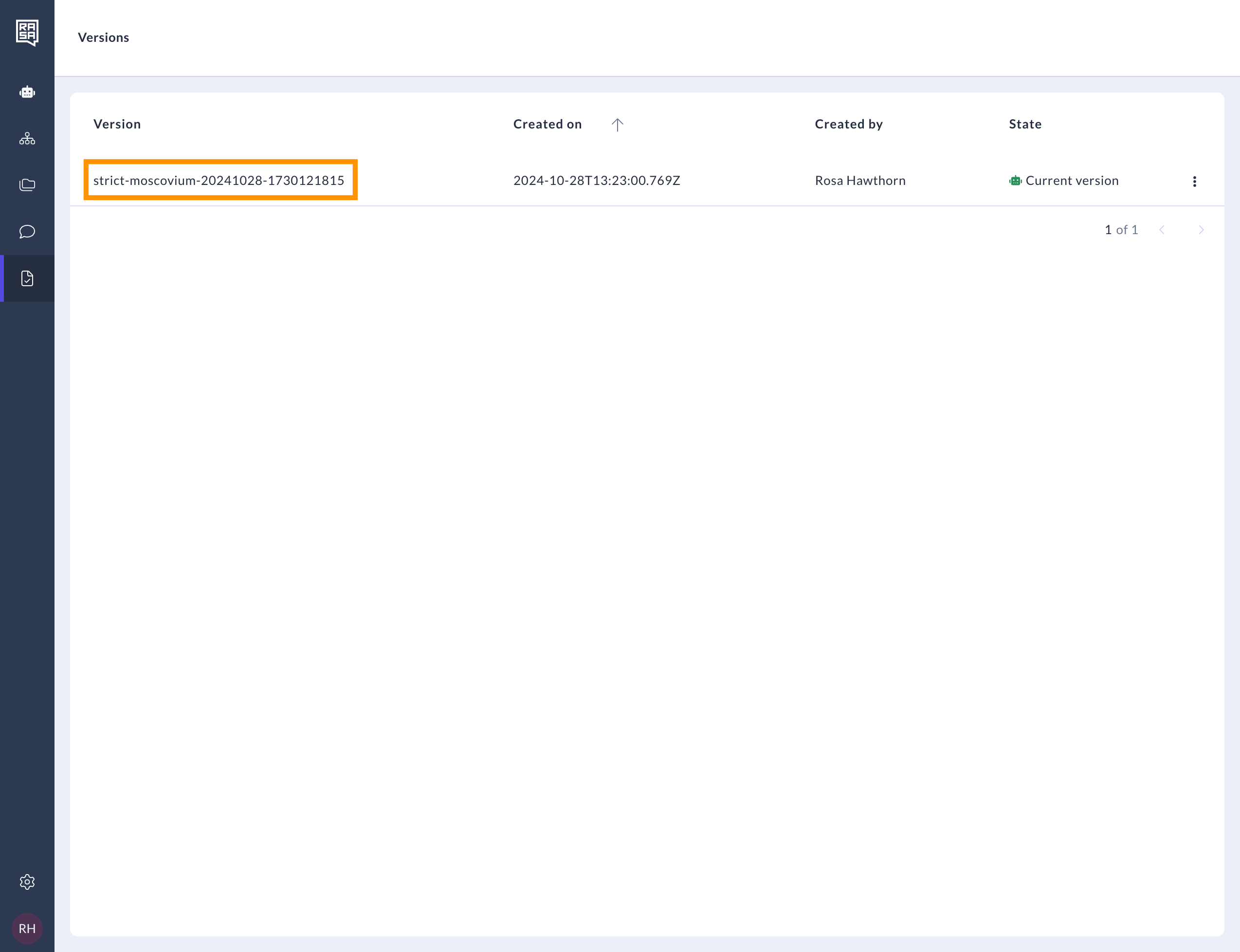
 * Assistant Version Name. See [user guide for training](/docs/studio/test/train-your-assistant) for more details.
 ## Available APIs
### Query: `ModelDownloadUrls`
**Schema:**
```graphql theme={null}
type Query {
modelDownloadUrls(input: ModelDownloadUrlsInput!): ModelDownloadUrlsOutput!
}
input ModelDownloadUrlsInput {
assistantId: ID!
assistantVersionName: ID
}
type ModelDownloadUrlsOutput {
modelFileUrl: String!
modelInputUrl: String!
}
```
#### Input: `ModelDownloadUrlsInput`
| Field | Description |
| ---------------------- | --------------------------------------------------------------- |
| `assistantId` | Unique identifier of the assistant. |
| `assistantVersionName` | Optional version of the trained assistant. Default is `latest`. |
#### Output: `ModelDownloadUrlsOutput`
| Field | Description |
| --------------- | ----------------------------------------------------------------- |
| `modelFileUrl` | Url to download the model file `.tar.gz`. |
| `modelInputUrl` | Url to download the model input data in YAML format. |
## Usage
The query can be used to fetch the download URLs for the trained model and the input data in YAML format for a assistant.
### Example `curl` Request
Request the Model Download API using e.g. `curl`:
```bash theme={null}
curl -X POST https:///api/graphql \
-H "Content-Type: application/json" \
-H "Authorization: Bearer " \
-d '{
"query": "query ModelDownloadUrls($input: ModelDownloadUrlsInput!) { modelDownloadUrls(input: $input) { modelFileUrl modelInputUrl } }",
"variables": {
"input": {
"assistantId": "",
"assistantVersionName": ""
}
}
}'
```
### Example Response
The response will contain the download URLs for the trained model and the model input data.
```bash theme={null}
{"data":
{"modelDownloadUrls":
{
"modelFileUrl":"https:///api/v1/download/model-file/",
"modelInputUrl":"https:///api/v1/download/model-input/"
}
}
}
```
### Download model file
To download the model file, request the `modelFileUrl` with authorization header.
```bash theme={null}
curl "https:///api/v1/download/model-file/" \
-H "Authorization: Bearer " \
-O -J
```
The downloaded model file `.tar.gz` can be used to deploy the trained model.
### Download model input data
To download the model input YAML files, request the `modelInputUrl` with authorization header.
```bash theme={null}
curl "https:///api/v1/download/model-input/" \
-H "Authorization: Bearer " \
-O -J
```
The downloaded model input zipped directory `_model-input.tar.gz` contains the model input data in YAML format:
* `data/flows.yaml`
* `data/nlu.yaml`
* `config.yaml`
* `credentials.yaml`
* `domain.yaml`
* `endpoints.yaml`
## Related topics
- [Studio Change Log](/docs/reference/changelogs/studio-changelog.md)
- [Setting Up CI/CD](/docs/pro/deploy/ci-cd.md)
- [Rasa MCP Tools API Reference](/docs/reference/api/rasa-mcp-tools.md)
- [Authorization](/docs/reference/api/studio/api-authorization.md)
- [Model Storage](/docs/reference/integrations/model-storage.md)
## Available APIs
### Query: `ModelDownloadUrls`
**Schema:**
```graphql theme={null}
type Query {
modelDownloadUrls(input: ModelDownloadUrlsInput!): ModelDownloadUrlsOutput!
}
input ModelDownloadUrlsInput {
assistantId: ID!
assistantVersionName: ID
}
type ModelDownloadUrlsOutput {
modelFileUrl: String!
modelInputUrl: String!
}
```
#### Input: `ModelDownloadUrlsInput`
| Field | Description |
| ---------------------- | --------------------------------------------------------------- |
| `assistantId` | Unique identifier of the assistant. |
| `assistantVersionName` | Optional version of the trained assistant. Default is `latest`. |
#### Output: `ModelDownloadUrlsOutput`
| Field | Description |
| --------------- | ----------------------------------------------------------------- |
| `modelFileUrl` | Url to download the model file `.tar.gz`. |
| `modelInputUrl` | Url to download the model input data in YAML format. |
## Usage
The query can be used to fetch the download URLs for the trained model and the input data in YAML format for a assistant.
### Example `curl` Request
Request the Model Download API using e.g. `curl`:
```bash theme={null}
curl -X POST https:///api/graphql \
-H "Content-Type: application/json" \
-H "Authorization: Bearer " \
-d '{
"query": "query ModelDownloadUrls($input: ModelDownloadUrlsInput!) { modelDownloadUrls(input: $input) { modelFileUrl modelInputUrl } }",
"variables": {
"input": {
"assistantId": "",
"assistantVersionName": ""
}
}
}'
```
### Example Response
The response will contain the download URLs for the trained model and the model input data.
```bash theme={null}
{"data":
{"modelDownloadUrls":
{
"modelFileUrl":"https:///api/v1/download/model-file/",
"modelInputUrl":"https:///api/v1/download/model-input/"
}
}
}
```
### Download model file
To download the model file, request the `modelFileUrl` with authorization header.
```bash theme={null}
curl "https:///api/v1/download/model-file/" \
-H "Authorization: Bearer " \
-O -J
```
The downloaded model file `.tar.gz` can be used to deploy the trained model.
### Download model input data
To download the model input YAML files, request the `modelInputUrl` with authorization header.
```bash theme={null}
curl "https:///api/v1/download/model-input/" \
-H "Authorization: Bearer " \
-O -J
```
The downloaded model input zipped directory `_model-input.tar.gz` contains the model input data in YAML format:
* `data/flows.yaml`
* `data/nlu.yaml`
* `config.yaml`
* `credentials.yaml`
* `domain.yaml`
* `endpoints.yaml`
## Related topics
- [Studio Change Log](/docs/reference/changelogs/studio-changelog.md)
- [Setting Up CI/CD](/docs/pro/deploy/ci-cd.md)
- [Rasa MCP Tools API Reference](/docs/reference/api/rasa-mcp-tools.md)
- [Authorization](/docs/reference/api/studio/api-authorization.md)
- [Model Storage](/docs/reference/integrations/model-storage.md)